Artificial Intelligence
ChatGPT Guide: How to Use ChatGPT Effectively in 2026
Learn how to use ChatGPT effectively for writing, learning, coding, research, files, images, brainstorming and productivity with practical prompting tips and examples.
ChatGPT Guide: A Complete Guide to Using ChatGPT Effectively
Artificial intelligence has moved from research laboratories into everyday life, and few AI tools have made that transition as visible as ChatGPT.
People use it to write emails, understand difficult subjects, brainstorm ideas, summarize documents, analyze data, learn programming, plan projects, translate languages, research topics, and work through complicated problems. What makes ChatGPT particularly interesting is that these tasks can often begin with something as simple as a natural-language conversation.
But there is a difference between using ChatGPT and using ChatGPT well.
A person can ask ChatGPT hundreds of questions and still get mediocre results. Another person can use the same tool to produce useful research notes, improve a business workflow, learn a new subject, analyze a document, or develop a detailed project.
The difference is usually not the AI alone.
It is the way the person communicates with it.
OpenAI describes ChatGPT as a conversational AI assistant that can help with tasks such as writing, studying, planning, coding, analyzing images and files, brainstorming, and problem-solving. Depending on the account, settings, and available tools, ChatGPT can also work with files, images, web information, voice, and other capabilities.
This guide explains how ChatGPT works as a practical tool, how to write better prompts, how to continue a conversation effectively, how to use files and images, how to approach research, and how to avoid some of the most common mistakes.
What Is ChatGPT?
ChatGPT is an AI assistant designed to understand natural-language instructions and generate responses based on those instructions.
Instead of learning a complicated command language, you can communicate with it much like you would communicate with another person.
You might write:
Explain quantum computing to me like I'm a beginner.
Or:
Rewrite this email so it sounds professional but friendly.
Or:
Analyze this spreadsheet and identify the most important trends.
Or:
Help me create a five-month learning plan for Python.
The quality of the result depends partly on the model's capabilities, but it also depends heavily on the information and instructions you provide.
OpenAI's current guidance emphasizes that prompts can be ordinary text, but can also involve images, audio, and files. It also recommends refining requests through follow-up questions rather than treating the first response as the final answer.
ChatGPT is designed around natural-language conversation, allowing users to begin with a question or instruction and continue refining the result.
This conversational approach is one of the reasons ChatGPT feels different from traditional software.
You don't necessarily need to know exactly what command to use.
You can explain what you are trying to accomplish.
How Does ChatGPT Work?
Behind the simple chat interface is a large language model.
Large language models are trained on very large collections of data and learn statistical patterns in language and other information. When you provide a prompt, the model processes the context and generates a response based on its learned capabilities and the instructions available in the conversation.
That sounds simple, but the process is extremely sophisticated.
ChatGPT can recognize relationships between concepts, follow multi-step instructions, transform text, generate explanations, analyze information, and produce structured outputs.
However, it is important to understand what ChatGPT is not.
It is not a human being.
It does not possess human experiences.
It does not automatically know whether every statement it produces is correct.
And depending on the situation, its knowledge or available information may be incomplete.
That is why good ChatGPT usage involves both generation and verification.
For everyday tasks, ChatGPT can be extremely useful as a first draft, thinking partner, tutor, analyst, or assistant. For high-stakes decisions, however, important claims should be checked against authoritative sources.
Getting Started With ChatGPT
Starting with ChatGPT is relatively simple.
Open ChatGPT and begin a new conversation.
Then describe what you want.
OpenAI's current beginner guidance recommends starting with a simple task and then refining the response with follow-up questions or additional context.
For example, instead of trying to construct a perfect prompt immediately, you could write:
I want to learn cybersecurity. Create a beginner roadmap.
After receiving the roadmap, you could continue:
Make it suitable for someone who has never studied networking.
Then:
Turn it into a six-month weekly plan.
Then:
Add free resources and practical projects.
The conversation gradually becomes more useful because each request adds context.
This is one of the most important ideas for beginners:
You do not have to get everything right in your first prompt.
ChatGPT is designed for conversation.
What Can You Use ChatGPT For?
ChatGPT has a remarkably broad range of possible uses.
Some are simple.
Others involve several stages of reasoning and interaction.
Writing
You can use ChatGPT to:
- Draft articles
- Rewrite paragraphs
- Improve grammar
- Create outlines
- Write emails
- Develop scripts
- Generate ideas
- Simplify complicated text
- Change tone and style
- Summarize long documents
Education
Students can use it to:
- Explain difficult concepts
- Create study plans
- Generate practice questions
- Compare theories
- Summarize lessons
- Practice languages
- Work through examples
- Prepare revision notes
Programming
Developers can use ChatGPT to:
- Explain code
- Find potential bugs
- Generate examples
- Refactor code
- Design APIs
- Explain programming concepts
- Create tests
- Debug errors
- Explore architecture options
Business
Professionals can use it for:
- Market research
- Business plans
- Meeting summaries
- Reports
- Presentations
- Customer communication
- Brainstorming
- Process documentation
- Data analysis
Personal Productivity
ChatGPT can also help organize everyday work.
For example:
Turn these notes into a task list.
Create a weekly study schedule.
Help me prepare questions for a meeting.
Compare these three options.
The important thing is not to ask, "What can ChatGPT do?"
A better question is:
"What repetitive or difficult task am I already doing that could benefit from an AI assistant?"
OpenAI's current Academy guidance makes a similar point: useful starting tasks are often things you already do, such as drafting, brainstorming, summarizing, or organizing information.
The Most Important Skill: Writing a Good Prompt
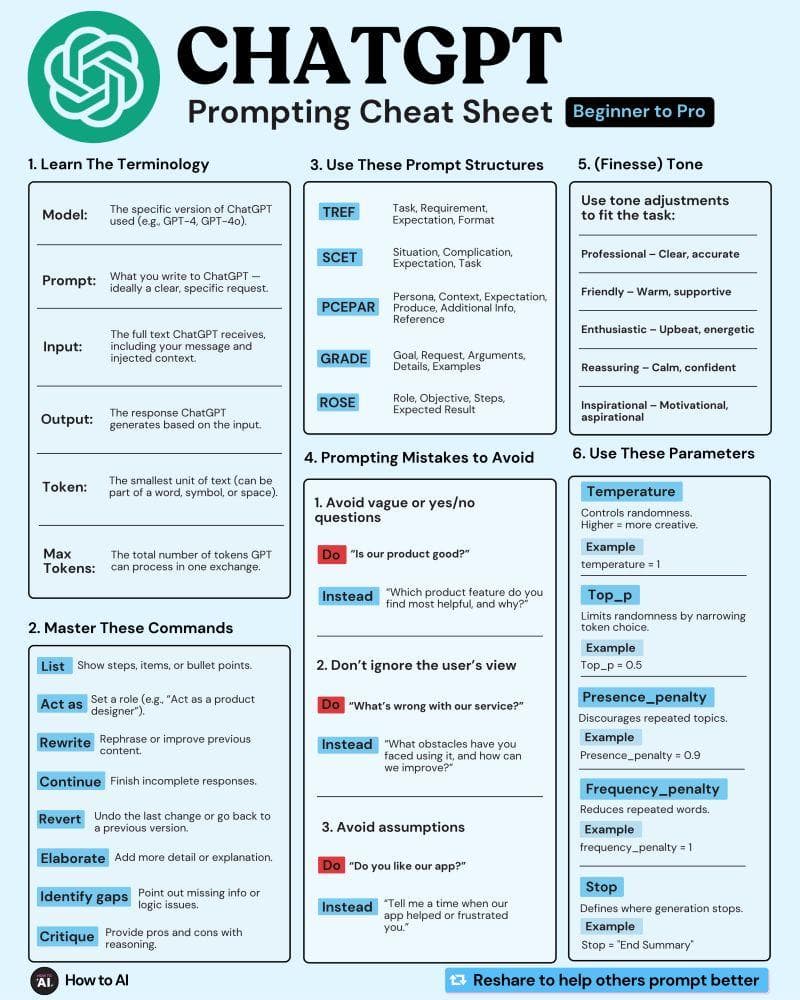
A prompt is the instruction, question, or information you provide to ChatGPT.
Prompting does not require complicated formulas.
In fact, OpenAI's current prompting guidance recommends clear instructions, useful context, and a description of the desired output. It also emphasizes iterative refinement rather than searching for one magical "perfect prompt."
A useful prompt often contains four elements:
1. The task
Tell ChatGPT what you want it to do.
2. Context
Explain the situation.
3. Audience or purpose
Tell it who the result is for and why you need it.
4. Output format
Explain how you want the answer presented.
For example, instead of:
Write about AI.
Try:
Write a beginner-friendly 2,000-word article explaining generative AI for university students. Use natural language, real-world examples, clear H2 headings, and a short FAQ at the end.
The second request gives ChatGPT considerably more direction.
Bad Prompt vs. Better Prompt
Consider a simple example.
Weak prompt
Write an article about cybersecurity.
This leaves many questions unanswered.
Who is the audience?
How long should it be?
What level?
What aspects should be covered?
What tone?
What format?
Now consider:
Better prompt
Write a 2,500-word beginner-friendly article about cybersecurity for general internet users. Explain common threats, phishing, malware, passwords, two-factor authentication, public Wi-Fi, and basic security practices. Use natural language, practical examples, H2 and H3 headings, and finish with an FAQ section.
The second prompt gives the model a much clearer target.
That does not guarantee perfection.
But it reduces ambiguity.
Don't Treat ChatGPT Like a Search Box
One of the biggest mistakes beginners make is treating ChatGPT as if every interaction were a Google search.
They ask:
Best laptop?
And expect a perfect answer.
But the question is missing important context.
Best for whom?
For gaming?
Programming?
University?
Video editing?
Under $500?
Under $1,500?
Battery life?
Portability?
Instead, provide the decision criteria.
For example:
I need a laptop for programming and university work. My budget is $1,000. Battery life and portability are more important than gaming performance. Compare the main types of laptops I should consider and explain what specifications matter.
Now ChatGPT has a problem it can actually reason about.
The Power of Follow-Up Questions
One of ChatGPT's greatest strengths is that you can continue the conversation.
Suppose you ask:
Explain blockchain.
The answer may be useful but too general.
You can then say:
Explain it again using a simple banking example.
Then:
Now explain the role of cryptographic hashing.
Then:
Explain Proof of Work and Proof of Stake.
Then:
Create a diagram-like text explanation showing how a transaction moves through the network.
Each question builds on the previous conversation.
OpenAI specifically recommends iterative interaction: if the first response is not quite right, clarify or adjust the request rather than assuming you need to start from scratch.
Clear prompts and iterative follow-up questions can turn a simple conversation into a much more structured workflow.
This is why experienced users often have longer conversations with ChatGPT.
They are not necessarily writing enormous prompts.
They are refining the task step by step.
How to Ask ChatGPT to Explain Something
One of the best uses of ChatGPT is learning.
But "Explain this" is often too vague.
Instead, specify your level.
For example:
Explain nuclear fusion to a 12-year-old.
Or:
Explain nuclear fusion to a first-year physics student.
Or:
Explain nuclear fusion at an undergraduate engineering level, including the basic plasma physics.
You can also request an analogy.
Explain quantum entanglement using a real-world analogy, then explain where the analogy breaks down.
This last part is especially useful.
Analogies make difficult ideas easier to understand, but they can also oversimplify scientific concepts.
Asking ChatGPT to explain both the analogy and its limitations produces a more intellectually useful answer.
Use ChatGPT as a Tutor, Not Just an Answer Machine
Suppose you are learning Python.
Instead of saying:
Teach me Python.
You can create an interactive learning system.
Start with:
Act as my Python tutor. I am a complete beginner. Create a learning path that starts with variables and gradually moves toward functions, object-oriented programming, APIs and projects. Teach one topic at a time and give me exercises before moving forward.
Now the interaction becomes more educational.
You can ask ChatGPT to quiz you.
Give me five Python questions without showing the answers.
After answering:
Check my answers and explain only the questions I got wrong.
You can then request:
Give me a small coding project using the concepts I have learned.
This turns ChatGPT into an interactive learning partner.
Using ChatGPT for Writing
Writing is one of the most common ChatGPT use cases.
But simply saying:
Write an article about artificial intelligence.
will usually produce a generic result.
Better results come from defining the editorial objective.
For example:
Write a long-form technology article about artificial intelligence for general readers. Start with a real-world scenario, explain the technology progressively, use examples rather than excessive jargon, maintain a natural human editorial tone, and finish with practical implications and an FAQ.
You can then refine it.
Make the introduction more engaging.
Reduce repetition.
Add more technical depth to the neural-network section.
Rewrite the conclusion so it does not sound promotional.
This iterative editing process is often more useful than trying to generate a perfect article in one request.
Using ChatGPT for SEO Content
ChatGPT can also assist with SEO workflows.
For example, you can ask it to develop:
- Search intent
- Article outlines
- Topic clusters
- Meta descriptions
- Title variations
- FAQ questions
- Internal-link suggestions
- Content briefs
- Keyword groupings
But SEO content should not simply be a collection of repeated keywords.
A useful article still needs to answer the reader's question.
A better prompt might be:
Create an SEO content brief for the keyword "quantum computing." Identify search intent, important subtopics, questions beginners have, possible H2 sections, related terminology, internal-link opportunities, and an FAQ. Prioritize usefulness over keyword repetition.
This produces a strategy rather than just a keyword list.
Using ChatGPT for Coding
ChatGPT can be particularly useful during software development.
You can paste an error and ask:
Explain this error and identify the most likely causes.
Or:
Review this React component and identify potential performance problems.
Or:
Refactor this function for readability without changing its behavior.
The quality of the result improves when you provide relevant context.
Instead of:
My code doesn't work.
Give:
- The relevant code
- The error message
- Expected behavior
- Actual behavior
- Framework or language
- Relevant environment information
Then ask for diagnosis.
For example:
This is a Next.js application using TypeScript. The API request returns a 500 error. Here is the route handler and the error log. Identify the most likely cause, explain why it occurs, and provide a corrected version.
This gives ChatGPT something concrete to analyze.
Ask for Explanations, Not Just Corrections
When ChatGPT fixes code, don't always accept the replacement immediately.
Ask:
Explain why my original code failed.
Then:
What concept do I need to understand to avoid this problem in the future?
This transforms debugging into learning.
The same principle applies to mathematics, writing, science and other subjects.
Instead of only asking for the answer, ask:
Why?
Using ChatGPT With Files
Depending on the features available to your account and conversation, ChatGPT can work with uploaded documents, images and other files. OpenAI lists document analysis, image analysis and related file capabilities among ChatGPT's available tools.
This can be useful for:
- PDFs
- Reports
- Presentations
- Text documents
- Spreadsheets
- Images
- Research materials
For example, instead of pasting a long report into the chat, you could upload it and ask:
Summarize this report in 10 bullet points.
Then:
Identify the three most important findings.
Then:
Explain the findings in simple language.
Then:
Turn the findings into a presentation outline.
The important advantage is that the AI can work from the material you provide rather than requiring you to manually reproduce everything in the prompt.
Asking ChatGPT to Analyze an Image
ChatGPT can also work with visual information when image input is available.
You might upload:
- A chart
- A screenshot
- A diagram
- A photograph
- A document page
- A product image
- A handwritten note
Then ask a specific question.
For example:
What information is shown in this chart?
Or:
Explain this network diagram.
Or:
Extract the text from this image and organize it into a table.
Or:
What are the most important visual differences between these two diagrams?
OpenAI's capabilities documentation describes image analysis as one of ChatGPT's supported capabilities, subject to the tools and settings available in the particular conversation.
Using Voice With ChatGPT
Typing is not always the fastest way to communicate.
ChatGPT's voice capabilities can allow users to speak with ChatGPT and hear responses, while dictation can convert spoken words into text. OpenAI's current getting-started guide describes voice as useful for hands-free workflows, brainstorming, presentations, and other situations where speaking is more convenient than typing.
Imagine you are walking and suddenly have an idea for a project.
Instead of typing:
I have an idea...
you can explain it verbally.
Then ask:
Organize that idea into a business concept with a problem statement, target audience, features and possible revenue model.
Voice can therefore become more than a conversational novelty.
It can be an input method for thinking.
Using ChatGPT for Brainstorming
AI is particularly useful when you are stuck at the beginning of a project.
Suppose you want to launch a technology blog.
Instead of:
Give me blog ideas.
Try:
I want to build a technology publication for general readers. Generate 30 evergreen topic clusters covering AI, cybersecurity, programming, space technology, consumer technology and future science. For each cluster, give five article ideas and identify which topics are suitable for beginners.
Now the output becomes more structured.
You can continue:
Remove repetitive ideas.
Select the 20 strongest topics.
Turn them into a six-month editorial calendar.
Group them into content pillars.
This is how a simple brainstorming request can evolve into a practical strategy.
Ask for Alternatives
Sometimes you know what you want but don't know the best way to approach it.
ChatGPT can generate alternatives.
For example:
Give me three different approaches to this problem: a simple approach, a scalable approach and a low-cost approach.
Or:
Give me three versions of this introduction: professional, conversational and magazine-style.
Or:
Compare these two software architectures and explain when each would be appropriate.
This is especially useful during planning.
Instead of asking ChatGPT to make the decision immediately, ask it to map the options first.
Tell ChatGPT What Matters Most
Not every requirement has equal importance.
Suppose you are choosing software.
You might say:
My priorities, in order, are security, ease of maintenance, cost and performance.
This gives ChatGPT a decision framework.
OpenAI's prompting guidance similarly recommends specifying priorities such as accuracy, creativity, speed, tone and desired format when those priorities matter.
The same approach works for writing.
Accuracy is more important than creativity. Use a formal tone and avoid unsupported claims.
Or:
Readability is more important than technical depth. Assume the audience is completely new to the subject.
Small instructions like these can substantially change the resulting response.
Ask ChatGPT to Challenge Your Idea
One of the more advanced ways to use AI is to ask it to disagree with you.
Suppose you have a business idea.
Instead of:
Tell me why this business idea is good.
Ask:
Critically evaluate this business idea. Identify the strongest reasons it could fail, the assumptions I may be making, potential competitors, and the evidence I should collect before investing money.
This creates a much more useful analysis.
You can then ask:
Now make the strongest argument in favor of the idea.
The goal isn't to make ChatGPT decide everything.
The goal is to expose the assumptions behind your decision.
ChatGPT for Research
ChatGPT can be useful for research, but research quality depends heavily on the workflow.
For basic background knowledge, you might ask for an explanation.
For current information, you may need web search or another current-information source.
For more complex research, ChatGPT may have tools such as Search or Deep Research available depending on your account and settings. OpenAI describes Deep Research as a tool for multi-step research that can synthesize information across online sources and produce cited outputs.
A good research workflow might look like this:
Question → Background → Sources → Comparison → Analysis → Verification → Final writing
Do not jump directly from:
Research this topic.
to publishing the resulting text.
Review the important claims.
Check dates.
Look at the original sources.
Separate facts from interpretations.
Why You Should Verify Important Information
One of the biggest mistakes people make with AI is assuming that a confident answer must be a correct answer.
It isn't.
AI systems can produce incorrect information.
They can misunderstand a question.
They can make unsupported assumptions.
They can present uncertain information confidently.
This becomes particularly important for:
- Medical information
- Legal questions
- Financial decisions
- Current events
- Scientific claims
- Technical specifications
- Security advice
- Statistics
For important claims, use primary or authoritative sources whenever possible.
For example, if you're writing about OpenAI's current product features, check current OpenAI documentation rather than relying on an old article.
If you're writing about a scientific discovery, check the original paper or a reputable scientific institution.
If you're writing about a law, check the relevant legal authority.
ChatGPT should help you understand and organize information, not remove the need for judgment.
ChatGPT and Privacy
Users should also think carefully about what information they provide to AI systems.
Do not casually paste sensitive information into a conversation simply because the AI can process it.
Be especially cautious with:
- Passwords
- Authentication codes
- Private financial information
- Confidential business information
- Personal identification documents
- Sensitive customer information
- Private credentials
- Proprietary source code
The exact data controls and retention options available can vary by product, plan, workspace and settings.
For professional environments, organizations should establish clear policies governing what employees can upload or share with AI tools.
AI productivity should not come at the cost of careless information handling.
ChatGPT Is a Collaborator, Not an Oracle
There is a useful mental model for ChatGPT:
Don't think of it as an oracle. Think of it as a highly capable collaborator.
A collaborator can:
- Generate ideas
- Explain concepts
- Produce drafts
- Find patterns
- Offer alternatives
- Organize information
- Challenge assumptions
- Help you think
But you still need to:
- Define goals
- Provide context
- Review outputs
- Verify important information
- Make decisions
- Take responsibility for the final result
This mindset produces much better results than blindly accepting every answer.
OpenAI's own personalization guidance recommends treating ChatGPT more like a collaborator than simply a search box, with context and direction helping it produce more useful and consistent responses.
Personalizing ChatGPT
Depending on the features available to you, ChatGPT can be personalized with instructions and memory.
Custom instructions can tell ChatGPT things such as your preferred tone, role, or response style.
For example:
I prefer concise answers. Use tables when comparing products. Explain technical concepts with practical examples.
That can reduce the need to repeat the same preferences in every conversation.
OpenAI explains that custom instructions can provide information about you and your preferred response style, while memory can help ChatGPT use relevant information across interactions when that feature is available.
The important point is that personalization should make the interaction more useful—not replace clear instructions for a specific task.
Projects and Long-Term Work
Some tasks are too large for a single conversation.
Imagine you are building a website.
You may need:
- Requirements
- Design decisions
- Documentation
- Code
- Research
- Content
- Testing
- Debugging
- Planning
A single prompt is not enough.
ChatGPT's current product ecosystem includes workflows such as Projects and other structured capabilities intended to help organize ongoing work. OpenAI's Academy describes Projects as a way to work from shared context across conversations.
The broader idea is important even if you are not using Projects:
Separate a large goal into a repeatable workflow.
For example:
Phase 1 — Research
Phase 2 — Planning
Phase 3 — Development
Phase 4 — Testing
Phase 5 — Documentation
AI becomes more useful when the workflow itself is structured.
A Powerful ChatGPT Workflow
For complex tasks, use this pattern:
Step 1 — Explain the goal
Tell ChatGPT what you ultimately want.
Step 2 — Provide context
Give the information it needs.
Step 3 — Define constraints
Mention budget, length, audience, technology, deadline or other limitations.
Step 4 — Ask for a plan
Don't immediately ask it to execute everything.
Step 5 — Review the plan
Correct assumptions.
Step 6 — Execute one stage
Ask ChatGPT to complete the first part.
Step 7 — Review the output
Identify problems.
Step 8 — Refine
Ask for improvements.
Step 9 — Verify
Check important claims and results.
Step 10 — Finalize
Only then produce the final deliverable.
This approach works for writing, coding, research, business planning, education and many other tasks.
Common ChatGPT Mistakes
1. Giving almost no context
Make it better.
Better than what?
Explain what you want changed.
2. Asking for everything at once
A huge request containing twenty unrelated tasks can produce inconsistent results.
Break complex work into stages.
3. Never correcting the AI
If the answer is wrong, say so.
That assumption is incorrect. The project uses MongoDB, not PostgreSQL. Revise the solution.
Conversation gives you an opportunity to steer the output.
4. Accepting the first answer
The first answer is often a starting point.
Ask:
Improve this.
What is missing?
What assumptions did you make?
Give me an alternative.
5. Trusting unsupported claims
If something is important, verify it.
6. Asking vague questions
Instead of:
Tell me about marketing.
Try:
Explain five digital marketing strategies suitable for a new technology blog with a small budget. Compare expected difficulty, cost and time to see results.
7. Using AI without understanding the output
If ChatGPT generates code, don't blindly deploy it.
If it produces a legal explanation, don't assume it is legal advice.
If it produces scientific claims, check the sources.
AI literacy includes knowing when not to trust an answer.
Advanced Prompt Template
A reusable structure for many tasks looks like this:
Goal: [What I want to achieve]
Context: [Important background information]
Audience: [Who will use/read the result]
Requirements: [Specific things that must be included]
Constraints: [Length, budget, technology, deadline, etc.]
Output: [How I want the answer structured]
Priority: [Accuracy, simplicity, creativity, depth, speed, etc.]
Before answering: Identify any important assumptions or missing information.
You don't need to use this structure for every conversation.
For simple questions, a simple question is better.
The template becomes useful when the task is complex.
20 Practical Prompts You Can Use
Learning
Explain [topic] to me as a complete beginner. Start with the basic idea, then gradually introduce technical details.
Research
Give me an overview of [topic], identify the most important subtopics, and tell me which claims should be verified using primary sources.
Writing
Rewrite this text so it sounds natural, clear and professional without changing the meaning.
Article Writing
Create a detailed article outline about [topic] for general readers. Include the main questions readers are likely to have.
Coding
Explain this error, identify the likely cause, and show me how to fix it without changing unrelated parts of the application.
Debugging
Analyze this code and identify potential bugs. Explain each problem before suggesting a correction.
Brainstorming
Give me 20 ideas for [goal]. Group them by difficulty and potential impact.
Decision Making
Compare these options using cost, performance, reliability, complexity and long-term scalability.
Studying
Create a seven-day study plan for [subject]. Include daily lessons, practice questions and revision tasks.
Exam Preparation
Quiz me on [subject]. Ask one question at a time and don't reveal the answer until I respond.
Summarization
Summarize this document in five key points, then explain the most important conclusion in simple language.
Data Analysis
Analyze this dataset and identify the most important trends, unusual values and relationships.
Business
Analyze this business idea. Identify the target customer, problem, competitive advantages, risks and five assumptions that should be tested.
Presentation
Turn these notes into a 10-slide presentation outline with a clear narrative.
Rewrite this email so it is professional, concise and friendly.
Planning
Turn this goal into a step-by-step plan with milestones, dependencies and potential risks.
Critical Thinking
Challenge this idea. Give me the strongest arguments against it and identify assumptions I may have overlooked.
Comparison
Compare these two technologies for a small business. Focus on cost, maintenance, scalability, security and learning curve.
Career
Based on these skills and interests, identify possible career paths and the skills I should develop for each.
The Future of ChatGPT
The most interesting development in ChatGPT may not simply be that AI can generate better text.
The larger change is that AI assistants are becoming capable of working across different kinds of information and tasks.
A user can potentially begin with a question, provide a document, analyze an image, search for information, generate an outline, write code, refine the result, and organize the work into a longer workflow.
OpenAI's current Academy overview describes ChatGPT as extending beyond basic conversation into areas such as files, search and deep research, image creation, Projects, custom GPTs and other workflows, with availability depending on the user's setup.
That suggests an important shift.
AI is moving from:
"Answer my question."
toward:
"Help me complete this task."
That is a much more powerful concept.
The Real Skill Is AI Literacy
Learning ChatGPT is not primarily about memorizing hundreds of prompts.
The more valuable skills are:
- Knowing how to define a problem
- Providing useful context
- Breaking complex tasks into stages
- Asking good follow-up questions
- Evaluating AI-generated information
- Verifying important claims
- Protecting sensitive information
- Understanding limitations
- Using the right tool for the right task
A person who understands these principles can adapt even as AI models change.
Specific buttons may move.
Features may be renamed.
Models will improve.
New tools will appear.
But the fundamental skill remains the same:
Know what you want, communicate it clearly, and critically evaluate what you receive.
Final Thoughts
ChatGPT is much more than a chatbot that answers questions.
Used casually, it can provide quick explanations, ideas and drafts.
Used thoughtfully, it can become a powerful assistant for learning, writing, research, programming, planning, analysis and creative work.
The biggest improvement usually does not come from writing an incredibly complicated prompt.
It comes from learning how to have a better conversation.
Give the AI enough context.
Explain the goal.
State the constraints.
Describe the desired result.
Ask follow-up questions.
Challenge weak answers.
Provide corrections.
Verify important information.
And when the task becomes complicated, break it into smaller stages.
The people who get the most value from ChatGPT will not necessarily be those who know the most clever prompts.
They will be the people who learn how to think with AI without giving up their own judgment.
That is the real ChatGPT skill.
Frequently Asked Questions
What is ChatGPT?
ChatGPT is a conversational AI assistant that can help with tasks such as writing, studying, brainstorming, coding, planning, analysis and problem-solving. Depending on the user's available features, it can also work with files, images, web information and voice.
Is ChatGPT free?
ChatGPT has a free tier, while additional capabilities and usage limits can vary by plan and over time. OpenAI's Help Center provides current information about available plans and features.
How do I get better answers from ChatGPT?
Give it a clear task, useful context, important constraints and the desired output format. Then refine the response through follow-up questions.
Can ChatGPT analyze files?
Depending on the features available in your account and conversation, ChatGPT can work with uploaded documents and other files for tasks such as summarization, extraction and analysis.
Can ChatGPT analyze images?
Yes. Image analysis is among ChatGPT's available capabilities, subject to the tools and settings available in a particular conversation.
Can I use ChatGPT for coding?
Yes. ChatGPT can help explain code, identify potential bugs, generate examples, reason through programming problems and assist with development workflows.
Can ChatGPT browse the internet?
ChatGPT can have web-search capabilities depending on the product configuration and available tools. OpenAI describes Search as useful for current information and Deep Research as a more extensive multi-step research capability.
Should I trust everything ChatGPT says?
No. ChatGPT can make mistakes. Important information should be checked against reliable and authoritative sources, particularly for medical, legal, financial, scientific and other high-stakes subjects.
What makes a good prompt?
A good prompt clearly describes the task, provides relevant context and explains what kind of output you want.
Is there a perfect ChatGPT prompt?
No. There is no universal perfect prompt. The best prompt depends on the task, context and desired result. Iterative refinement is often more effective than trying to construct a perfect request in one attempt.Write your article here...
About the Author
Aslam Hossain is the founder and editor of Vishtech Blog, creating accessible technology content about AI, software, startups, robotics, cybersecurity, and future innovations.
Comments
Article text preview: ChatGPT Guide: A Complete Guide to Using ChatGPT Effectively Artificial intelligence has moved from research laboratories into everyday life, and few